Introduction
A website can look beautiful and still fail to deliver results if visitors find it confusing or difficult to use. This is where UX design comes in.
UX stands for User Experience. UX design focuses on how people interact with a website and how easy, useful, and satisfying that experience is.
For businesses, good UX design can help visitors find information faster, build trust, increase engagement, and encourage more people to become customers.
In this guide, we’ll explain what UX design is, why it matters for websites, and the key principles businesses should follow.
What Is UX Design?
UX design is the process of designing a website around the needs, expectations, and behaviours of its users.
It focuses on the complete experience a person has when interacting with a website.
This includes:
- Navigation
- Page structure
- Content
- Forms
- Buttons
- Mobile experience
- Website speed
- Accessibility
- Checkout processes
- Overall usability
The goal is to make it easy for visitors to accomplish what they came to the website to do.
For example, if someone visits a business website looking for a phone number, good UX means they can find that number quickly without searching through multiple pages.
UX Design vs UI Design
UX and UI are closely related but aren’t the same thing.
UX Design
UX focuses on how the website works and feels to use.
It considers:
- User journeys
- Navigation
- Information architecture
- Usability
- Accessibility
- Conversion paths
UI Design
UI stands for User Interface and focuses more on the visual interface.
It includes:
- Colours
- Fonts
- Buttons
- Icons
- Spacing
- Visual elements
A website can have excellent UI but poor UX if it looks attractive but is difficult to navigate.
Why Is UX Design Important for Websites?
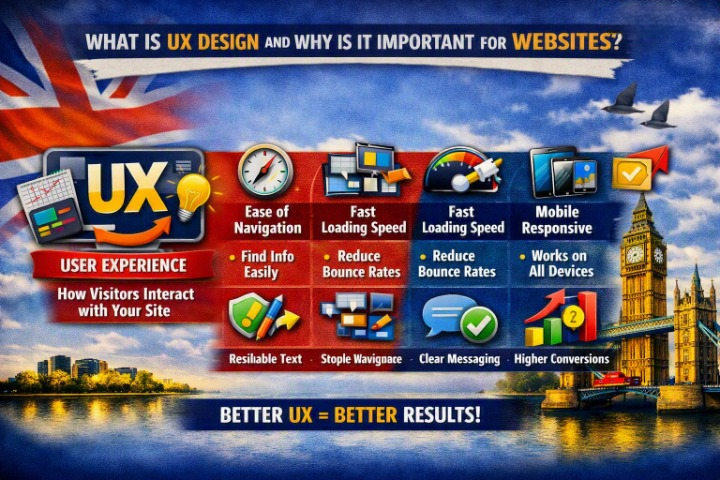
1. It Makes Websites Easier to Use
The primary purpose of UX design is usability.
Visitors should be able to:
- Find information
- Navigate between pages
- Complete forms
- Contact a business
- Purchase products
- Book services
without unnecessary confusion.
The easier a website is to use, the more likely visitors are to continue interacting with it.
2. UX Design Improves Customer Satisfaction
A frustrating website can create a negative impression of a business.
Imagine trying to:
- Find pricing information
- Contact customer support
- Book an appointment
- Complete a purchase
but every step is confusing.
Good UX removes unnecessary obstacles and creates a smoother experience.
3. UX Can Increase Conversions
UX design can directly influence whether visitors become customers.
A well-designed website can make it easier to:
- Submit an enquiry
- Request a quote
- Make a purchase
- Book an appointment
- Sign up for a service
Clear navigation, simple forms, strong CTAs, and well-structured pages can all contribute to better conversion rates.
4. UX Builds Trust
Visitors often judge a business based on its website.
A website that is:
- Professional
- Consistent
- Easy to use
- Fast
- Secure
can create a stronger sense of credibility.
On the other hand, broken links, confusing navigation, outdated design, and difficult forms can make a business appear less reliable.
5. UX Improves Mobile Experience
Good UX is especially important on smartphones.
Mobile users need:
- Simple navigation
- Readable text
- Touch-friendly buttons
- Fast loading
- Easy forms
- Properly sized content
A website shouldn’t simply shrink its desktop design. The mobile experience should be considered as part of the overall UX strategy.
6. UX Helps Visitors Find Information Faster
Information architecture is an important part of UX design.
A website should organize information logically.
For example, a business website might use:
Home → Services → Specific Service → Contact
Visitors should understand where they are and where they can go next.
Clear headings, menus, internal links, and page structures make information easier to find.
7. UX Can Reduce Bounce Rates
If visitors can’t quickly understand a website or find what they need, they may leave.
Improving UX can help by:
- Clarifying page messaging
- Improving navigation
- Increasing page speed
- Making content easier to scan
- Providing clear next steps
A lower bounce rate isn’t automatically a goal for every page, but a confusing user experience can certainly contribute to visitors leaving prematurely.
8. UX Supports SEO
UX and SEO are increasingly connected.
Search engines aim to provide useful results that satisfy users.
Website factors such as:
- Mobile usability
- Page experience
- Website speed
- Clear structure
- Helpful content
- Accessibility
can contribute to a better overall website experience.
However, UX should not be designed solely for search engines. The primary focus should always be the user.
9. UX Improves Accessibility
Good UX should consider people with different abilities and ways of interacting with websites.
Accessible UX can include:
- Good colour contrast
- Keyboard navigation
- Clear form labels
- Descriptive links
- Readable typography
- Logical headings
- Alternative text for meaningful images
Accessibility can make a website easier to use for a much wider audience.
10. UX Reduces Friction
In UX design, friction refers to anything that makes it unnecessarily difficult for users to complete a task.
Examples include:
- Long forms
- Complicated checkout
- Too many menu options
- Unclear buttons
- Slow pages
- Unexpected pop-ups
- Requiring unnecessary information
Good UX identifies these problems and removes as much unnecessary friction as possible.
Key Principles of Good UX Design
Keep Navigation Simple
Use clear menus and logical categories.
Be Consistent
Buttons, colours, typography, and layouts should behave consistently throughout the website.
Make Important Actions Obvious
Visitors should easily identify what they should do next.
Prioritize Content
Put the most important information where users can find it easily.
Keep Forms Simple
Ask only for information that is necessary.
Design for Mobile
Make sure the experience works properly on smaller screens.
Provide Feedback
Let users know when an action has been completed successfully or when an error has occurred.
The UX Design Process
A typical UX design process can include:
1. User Research
Understand the target audience, their needs, and their problems.
2. Define Goals
Determine what users and the business need to achieve.
3. Create User Journeys
Map out how visitors will move through the website.
4. Build Wireframes
Create simple page layouts before visual design begins.
5. Design the Interface
Develop the visual appearance and interactive elements.
6. Test the Website
Watch how real users interact with the website and identify problems.
7. Improve and Launch
Make improvements based on testing and launch the final website.
8. Continue Optimizing
Use analytics and feedback to improve the experience over time.
Examples of Good UX Design
Ecommerce Website
A good ecommerce UX makes it easy to:
- Find a product
- Understand its features
- Add it to the cart
- Complete checkout
Service Business
A good service website helps visitors:
- Understand the service
- See the benefits
- Build trust
- Request a quote
Restaurant Website
A restaurant website should make it easy to:
- View the menu
- Find opening hours
- Get directions
- Make a reservation
- Contact the restaurant
The best UX depends on the purpose of the website and what users are trying to accomplish.
Common UX Design Mistakes
Avoid these problems:
- Complicated navigation
- Too many pop-ups
- Unclear CTAs
- Tiny text
- Poor mobile layouts
- Long forms
- Slow loading pages
- Inconsistent design
- Hidden contact information
- Confusing checkout processes
- Too much unnecessary content
Even small usability problems can have a significant impact when thousands of visitors use a website.
UX Design Checklist
Before launching your website, ask:
- Can visitors understand what the business does quickly?
- Is navigation simple?
- Can users easily find important information?
- Are buttons and links clear?
- Are forms simple?
- Does the website work well on mobile?
- Is the website fast?
- Is the design consistent?
- Are important CTAs easy to find?
- Is the website accessible?
- Are checkout and booking processes simple?
- Have real users tested the website?
Final Thoughts
So, what is UX design and why is it important for websites?
UX design is about creating websites that are easy, useful, accessible, and enjoyable to use.
A successful website isn’t just about attractive colours and modern layouts. It should help visitors quickly understand the business, find the information they need, and complete important actions without unnecessary frustration.
For businesses, investing in UX can lead to a better customer experience, stronger trust, improved engagement, and potentially more leads and sales.
The best UX design is often invisible—the visitor simply finds the website easy to use.
Frequently Asked Questions
What does UX stand for?
UX stands for User Experience. It describes how users interact with and experience a product, service, or website.
Why is UX important for business websites?
Good UX makes websites easier to use, helps build trust, improves engagement, and can make it easier for visitors to complete actions such as contacting a business or making a purchase.
What is the difference between UX and UI?
UX focuses on the overall user experience, usability, and functionality. UI focuses primarily on the visual interface, including colours, typography, buttons, and other visual elements.
Does UX design improve SEO?
Good UX can support SEO by improving mobile usability, website performance, navigation, accessibility, and the overall experience. However, UX is only one part of a successful SEO strategy.
How can I improve UX on my website?
Start by simplifying navigation, improving page speed, making content easier to scan, optimizing mobile layouts, simplifying forms, strengthening CTAs, and testing the website with real users.
Does every website need UX design?
Yes. Every website has users, so every website benefits from considering how people navigate, understand, and interact with its content and features.