Introduction
A Content Management System (CMS) makes it easier for businesses to create, manage, and update website content without having to edit code every time.
Choosing the right CMS is an important decision because the platform you select can affect your website’s cost, performance, security, SEO, scalability, and ease of management.
There are many options available, including WordPress, Shopify, Wix, Squarespace, Webflow, and custom CMS solutions.
So, how do you choose the right CMS for your business?
The answer depends on your business goals, website type, budget, technical requirements, and plans for future growth.
What Is a CMS?
A CMS is software that allows you to manage website content through an administrative interface.
Depending on the platform, you may be able to manage:
- Web pages
- Blog posts
- Images
- Products
- Services
- Navigation menus
- Users
- Forms
- Ecommerce content
Without a CMS, making regular website changes may require a developer.
Why Choosing the Right CMS Matters
Your CMS can have a long-term impact on your business website.
The right platform can make it easier to:
- Update content
- Improve SEO
- Manage products
- Add new features
- Maintain security
- Scale your website
- Control costs
Choosing the wrong CMS can result in unnecessary development costs, limited functionality, or difficulty managing your website.
1. Define Your Website Goals
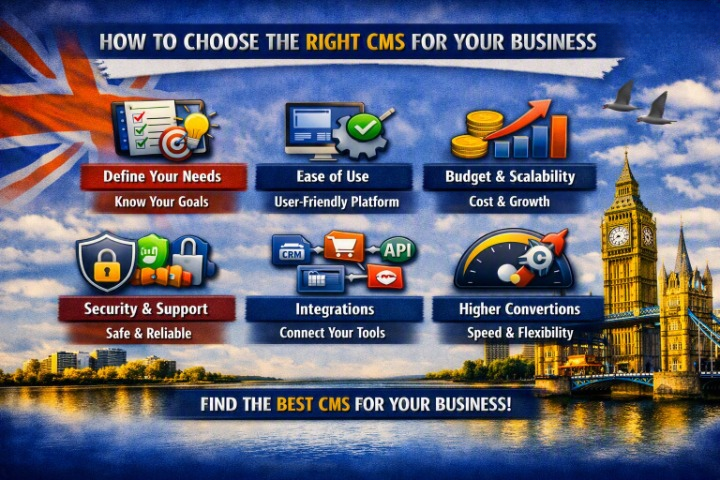
Before comparing CMS platforms, determine what you actually need your website to do.
Ask yourself:
- Is it a simple business website?
- Do you need an online store?
- Will you publish regular blog content?
- Do you need membership functionality?
- Will customers book appointments?
- Do you need customer accounts?
- Do you require custom integrations?
Your website’s requirements should guide your CMS choice.
2. Consider the Type of Business Website
Different businesses have different needs.
Service Businesses
A service company may need:
- Service pages
- Contact forms
- Testimonials
- Blog
- Booking functionality
- Local SEO
WordPress can be a strong option for these businesses.
Ecommerce Businesses
Online stores need:
- Product management
- Shopping carts
- Payments
- Inventory
- Shipping
- Order management
Platforms such as Shopify and WooCommerce can be suitable depending on your requirements.
Content-Focused Websites
Publishers, blogs, magazines, and businesses producing large amounts of content may benefit from a CMS with strong content management and SEO capabilities.
3. Evaluate Ease of Use
Think about who will manage your website after launch.
If your team isn’t technical, choose a CMS with an intuitive interface.
You should be able to easily:
- Create pages
- Edit content
- Upload images
- Publish blog posts
- Update products
- Manage basic website settings
A powerful CMS isn’t useful if your team finds it difficult to operate.
4. Check SEO Features
Your CMS should support your SEO strategy.
Important features can include:
- Custom page titles
- Meta descriptions
- SEO-friendly URLs
- XML sitemaps
- Heading management
- Image optimization
- Canonical URLs
- Redirect management
- Structured data support
Some platforms provide these features natively, while others rely on extensions or additional configuration.
5. Consider Your Budget
Don’t look only at the initial development cost.
Consider the total cost of ownership, including:
- Hosting
- Domain
- Themes
- Plugins
- Apps
- Development
- Maintenance
- Security
- Transaction fees
- Premium features
A platform that appears inexpensive initially may become expensive as your business grows.
6. Look at Customization Options
Your CMS should provide enough flexibility for your business.
Consider whether you need:
- Custom designs
- Custom templates
- Custom functionality
- API integrations
- Third-party services
- Custom checkout processes
- Advanced user roles
WordPress, for example, can be extended significantly through custom themes and plugins.
A more restricted platform may be easier to manage but provide less control over advanced functionality.
7. Think About Scalability
Your CMS should support your business as it grows.
Ask:
- Can I add more pages?
- Can I add more products?
- Can I add new features?
- Can the website handle more traffic?
- Can it integrate with other systems?
- Can multiple people manage it?
Choosing a platform that can scale can save you from having to migrate to another system later.
8. Check Security
Website security should be a major consideration.
Look at how the CMS handles:
- Software updates
- User permissions
- Authentication
- Backups
- Security patches
- Plugin or app security
Remember that security isn’t only about the CMS itself. Hosting, passwords, third-party extensions, and website maintenance also matter.
9. Consider Website Performance
Your CMS should allow you to build a fast website.
Performance can be affected by:
- Themes
- Plugins
- Apps
- Images
- Hosting
- Scripts
- Database structure
Don’t assume one CMS is automatically faster than another. A well-built website on a suitable platform can perform very well.
10. Review Integrations
Most modern businesses use multiple tools.
You may need your CMS to integrate with:
- CRM systems
- Email marketing platforms
- Accounting software
- Payment providers
- Analytics tools
- Booking systems
- Social media
- Inventory systems
Before choosing a CMS, check whether it supports the integrations your business relies on.
11. Consider Ecommerce Requirements
If you plan to sell online, ecommerce functionality becomes particularly important.
Consider:
- Product variations
- Inventory management
- Payment gateways
- Shipping
- Tax handling
- Discounts
- Customer accounts
- Order management
- Abandoned carts
A simple product catalogue has very different requirements from a large ecommerce operation.
12. Check Content Management Features
If your business regularly publishes content, look at how easy it is to manage:
- Blog posts
- Categories
- Authors
- Images
- Videos
- Documents
- Landing pages
A CMS should make publishing content efficient rather than creating unnecessary work.
13. Think About User Roles
If multiple employees will manage the website, user permissions become important.
You may need different access levels for:
- Administrators
- Editors
- Writers
- Marketing teams
- Store managers
Make sure the CMS allows you to control who can edit or publish content.
14. Evaluate Support and Community
A popular CMS can have a large community of developers and users.
This can make it easier to find:
- Tutorials
- Documentation
- Developers
- Plugins
- Themes
- Troubleshooting guides
For businesses, reliable professional support can also be valuable when dealing with critical website problems.
15. Avoid Choosing Based Only on Popularity
The most popular CMS isn’t automatically the best CMS for your business.
Instead, compare platforms based on:
- Requirements
- Budget
- Ease of use
- SEO
- Security
- Performance
- Scalability
- Integrations
Your business needs should come first.
Popular CMS Options for Businesses
WordPress
WordPress is a flexible CMS suitable for many business websites, blogs, service companies, and ecommerce websites.
Best for: Businesses wanting flexibility and control.
Shopify
Shopify is focused primarily on ecommerce and provides many features needed to run an online store.
Best for: Businesses focused on selling products online.
Wix
Wix provides an accessible website-building experience with hosting and website management included.
Best for: Small businesses looking for a relatively simple website-building solution.
Squarespace
Squarespace combines website building, hosting, and content management with professionally designed templates.
Best for: Businesses prioritizing simple management and visual presentation.
Webflow
Webflow provides more design control while combining visual website development with CMS functionality.
Best for: Businesses and teams that want greater visual design control.
Custom CMS
A custom CMS can be developed specifically around a company’s unique requirements.
Best for: Businesses with highly specialized workflows or complex technical needs.
CMS Comparison for Small Businesses
| CMS | Best For | Ease of Use | Flexibility | Ecommerce |
|---|---|---|---|---|
| WordPress | Most business websites | High | Very High | Excellent with WooCommerce |
| Shopify | Online stores | High | High | Excellent |
| Wix | Simple business websites | Very High | Medium | Good |
| Squarespace | Design-focused websites | High | Medium | Good |
| Webflow | Custom visual design | Medium | High | Good |
| Custom CMS | Specialized businesses | Depends | Very High | Custom |
Questions to Ask Before Choosing a CMS
Before making your decision, ask:
- What is the primary purpose of my website?
- Who will manage the content?
- What is my budget?
- Do I need ecommerce?
- How important is SEO?
- What integrations do I need?
- How much customization do I require?
- How quickly do I need to launch?
- How much maintenance can my team handle?
- How might my website requirements change in the next few years?
These questions can quickly narrow down your options.
Common CMS Selection Mistakes
Avoid choosing a CMS based only on:
- The cheapest price
- A friend’s recommendation
- A popular theme
- The number of available plugins
- How attractive the demo website looks
Also avoid choosing a platform with far more functionality than your business actually needs.
The best CMS is usually the one that provides the right balance of functionality, cost, usability, and flexibility.
Final Thoughts
Choosing the right CMS for your business starts with understanding what your website needs to accomplish.
For many small and medium-sized businesses, WordPress provides an excellent balance of flexibility, SEO capabilities, content management, and customization.
For ecommerce-focused businesses, Shopify or WooCommerce may be more appropriate. Other platforms can make sense when simplicity, design control, or specialized functionality is the priority.
Don’t choose a CMS simply because it’s popular. Choose the platform that fits your current requirements and future business goals.
Frequently Asked Questions
What is the best CMS for a small business?
There isn’t one CMS that is best for every business. WordPress is a strong option for many small businesses because of its flexibility, large ecosystem, and content management features.
Is WordPress still a good CMS in 2026?
Yes. WordPress remains a flexible option for business websites, blogs, and ecommerce projects, particularly when businesses want control over their website and content.
Which CMS is best for ecommerce?
Shopify and WooCommerce are both popular options. Shopify provides an integrated ecommerce platform, while WooCommerce adds ecommerce functionality to WordPress.
Can I change my CMS later?
Yes, but CMS migration can be complex. It may involve moving content, redesigning pages, recreating functionality, and protecting existing SEO URLs.
Should I use a custom CMS?
A custom CMS can make sense when your business has specialized requirements that existing platforms cannot efficiently handle. For a standard small-business website, it is often unnecessary.
How long does it take to choose a CMS?
For a simple business website, you can often narrow down the options quickly. For ecommerce or complex projects, it is worth spending more time evaluating functionality, integrations, costs, and scalability before making a decision.