Introduction
Getting visitors to your website is only half the battle. The real challenge is turning those visitors into customers, leads, bookings, or enquiries.
Your website conversion rate measures the percentage of visitors who complete a desired action. This could include submitting a contact form, making a purchase, booking an appointment, signing up for a newsletter, or requesting a quote.
If your website receives plenty of traffic but generates few conversions, there may be opportunities to improve your design, content, user experience, and calls to action.
This guide explains practical ways to improve your website conversion rate and turn more visitors into customers.
What Is Website Conversion Rate?
Website conversion rate is the percentage of visitors who complete a specific goal.
The basic formula is:
Conversion Rate = (Number of Conversions ÷ Number of Visitors) × 100
For example, if 1,000 people visit your website and 40 submit an enquiry form:
40 ÷ 1,000 × 100 = 4% conversion rate
Your conversion goal should depend on your business. A service company may focus on enquiries, while an ecommerce business may focus on completed purchases.
1. Make Your Value Proposition Clear
Visitors should quickly understand why they should choose your business.
Your homepage should clearly communicate:
- What your business offers
- Who you help
- What makes you different
- What visitors should do next
Instead of using a vague headline such as “Welcome to Our Website,” explain the specific benefit you provide.
A clear value proposition can immediately make your website more relevant to potential customers.
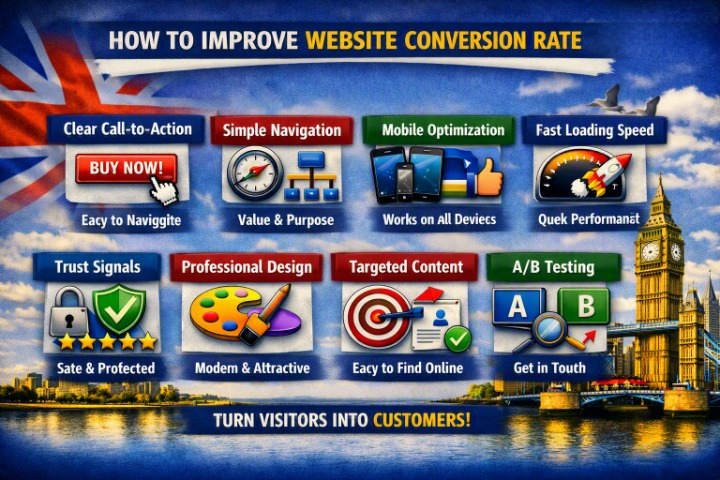
2. Use Strong Calls to Action
A call to action (CTA) tells visitors what to do next.
Examples include:
- Get a Free Quote
- Book a Consultation
- Contact Us
- Request a Callback
- Shop Now
- Start Your Free Trial
Use specific, action-oriented language instead of generic buttons such as “Click Here.”
Make important CTAs easy to find without overwhelming visitors with too many competing options.
3. Simplify Your Navigation
Complicated navigation can prevent visitors from finding the information they need.
Keep your main navigation focused on important pages such as:
- Home
- About
- Services
- Products
- Pricing
- Contact
For larger websites, use categories and dropdown menus carefully.
The goal is to help visitors reach important information with as little friction as possible.
4. Improve Website Speed
A slow website can negatively affect the user experience and make visitors leave before taking action.
Improve performance by:
- Compressing images
- Using modern image formats
- Enabling caching
- Improving hosting
- Reducing unnecessary scripts
- Optimizing CSS and JavaScript
- Using a CDN where appropriate
Always test performance on mobile devices as well as desktop computers.
5. Make Your Website Mobile-Friendly
Your website should provide a smooth experience on smartphones and tablets.
Check that:
- Text is easy to read
- Buttons are large enough to tap
- Forms work correctly
- Images fit the screen
- Menus are easy to use
- Important CTAs are visible
A poor mobile experience can result in lost leads and sales.
6. Build Trust With Social Proof
People are more likely to take action when they trust a business.
Add relevant trust signals such as:
- Customer reviews
- Testimonials
- Case studies
- Client logos
- Industry certifications
- Awards
- Product ratings
For service businesses, testimonials that explain the customer’s problem and result can be particularly effective.
7. Improve Your Contact Forms
Long or complicated forms can discourage potential customers.
Only request information you genuinely need.
For example, instead of asking for 10 different details, a basic enquiry form might only require:
- Name
- Phone number
- Message
You can collect additional information later if necessary.
Also make sure your forms are easy to use on mobile devices.
8. Create Dedicated Landing Pages
Sending every visitor to your homepage isn’t always the best approach.
Create dedicated landing pages for:
- Specific services
- Advertising campaigns
- Products
- Special offers
- Local searches
- Lead-generation campaigns
A focused landing page can match the visitor’s intent more closely and provide a clearer path to conversion.
9. Write Customer-Focused Content
Your website content should focus on the customer’s needs rather than simply describing your business.
Instead of saying:
“We have 15 years of industry experience.”
Explain how that experience benefits the customer.
For example:
“Get reliable website support from an experienced team that helps small businesses keep their websites secure and running smoothly.”
Focus on:
- Problems
- Benefits
- Results
- Solutions
- Customer concerns
10. Make Pricing Easier to Understand
If appropriate for your business, provide clear pricing information.
Visitors may leave if they can’t determine whether your service fits their budget.
You don’t always need to publish exact prices. You could provide:
- Starting prices
- Package options
- Price ranges
- “Request a quote” options
Clear pricing can reduce uncertainty and help qualify potential customers.
11. Use High-Quality Visuals
Images and videos can help visitors understand your products or services.
For ecommerce websites, use:
- Multiple product images
- Different angles
- Product demonstrations
- Videos where useful
- Clear product photography
For service businesses, consider:
- Team photos
- Project images
- Before-and-after examples
- Case study visuals
Avoid using generic stock images when authentic visuals would be more convincing.
12. Reduce Distractions
Every element on a page competes for the visitor’s attention.
Too many:
- Pop-ups
- Animations
- Banners
- CTAs
- Videos
- Social media widgets
can make the page confusing.
Keep important pages focused on one primary conversion goal.
13. Add FAQs
Frequently asked questions can remove doubts that prevent visitors from converting.
Answer questions about:
- Pricing
- Delivery
- Refunds
- Timelines
- Services
- Guarantees
- Support
- Payment methods
FAQs are particularly useful when customers need more information before making a decision.
14. Create a Strong Checkout Experience
For ecommerce websites, checkout optimization can have a major impact on conversions.
Make checkout:
- Simple
- Fast
- Mobile-friendly
- Secure
- Easy to understand
Avoid unnecessary steps and provide popular payment options where appropriate.
Clearly communicate:
- Delivery costs
- Delivery times
- Returns
- Payment security
Unexpected costs or complicated checkout processes can cause customers to abandon their purchases.
15. Use A/B Testing
A/B testing involves comparing two versions of a page or element to determine which performs better.
You could test:
- Headlines
- CTA text
- Button placement
- Images
- Forms
- Pricing layouts
- Landing page designs
Don’t change everything at once. Testing individual elements can help you understand what actually improves conversions.
16. Understand Your Visitors
Use analytics and user research to understand how people interact with your website.
Look at:
- Most visited pages
- Traffic sources
- Device types
- Conversion rates
- Exit pages
- Form submissions
- Ecommerce performance
This information can help identify where visitors are dropping out of the conversion process.
17. Fix Technical Problems
Technical issues can directly affect conversions.
Regularly check for:
- Broken links
- Broken forms
- 404 errors
- Slow pages
- Checkout problems
- Mobile layout issues
- Browser compatibility problems
A small technical problem can prevent a potential customer from completing an important action.
18. Offer Multiple Contact Options
Different customers prefer different communication methods.
Depending on your business, consider offering:
- Phone
- Contact forms
- Live chat
- Online booking
Make the most important contact method particularly easy to find.
19. Create Urgency Carefully
Urgency can encourage visitors to act, but it should be genuine.
Examples include:
- Limited-time offers
- Seasonal promotions
- Booking deadlines
- Limited stock
- Early-bird pricing
Avoid fake countdown timers or misleading scarcity. Trust is more valuable than a short-term conversion increase.
20. Monitor and Improve Continuously
Conversion optimization isn’t a one-time project.
After making changes, monitor:
- Conversion rate
- Leads
- Sales
- Revenue
- Form completion rate
- Cart abandonment
- Landing page performance
Use the data to identify new opportunities for improvement.
Website Conversion Rate Optimization Checklist
Use this checklist to improve your website:
- Clear value proposition
- Strong calls to action
- Simple navigation
- Fast loading speed
- Mobile-friendly design
- Customer reviews
- Clear contact forms
- Dedicated landing pages
- Customer-focused content
- Transparent pricing
- High-quality visuals
- Fewer distractions
- Helpful FAQs
- Simple checkout
- A/B testing
- Analytics and tracking
- Multiple contact options
- Regular technical checks
Common Conversion Rate Mistakes
Businesses often focus heavily on getting more traffic while ignoring the experience visitors receive after they arrive.
Common mistakes include:
- Unclear messaging
- Weak CTAs
- Slow page speed
- Poor mobile experience
- Complicated forms
- Too many pop-ups
- Lack of reviews
- Hidden contact information
- Confusing checkout
- No clear conversion goal
Fixing these issues can sometimes produce better results than simply increasing website traffic.
Final Thoughts
Improving your website conversion rate is about making it easier for visitors to understand your offer, trust your business, and take action.
Start with the fundamentals: clear messaging, strong CTAs, fast performance, mobile-friendly design, simple forms, social proof, and an easy user experience.
Then use analytics and testing to identify what works best for your specific audience.
A successful website doesn’t just attract visitors—it turns the right visitors into customers.
Frequently Asked Questions
What is a good website conversion rate?
There is no single conversion rate that is considered good for every business. Conversion rates vary significantly by industry, traffic source, offer, device, and conversion goal. The most useful benchmark is often your own historical performance.
How can I increase my website conversion rate quickly?
Start with high-impact improvements such as making your value proposition clearer, strengthening CTAs, improving page speed, simplifying forms, adding customer reviews, and fixing mobile usability issues.
Does website design affect conversion rates?
Yes. Website design influences trust, usability, navigation, readability, and how easily visitors can complete important actions.
Does SEO improve conversion rates?
SEO primarily helps attract relevant organic traffic. When the traffic matches your products or services and lands on well-optimized pages, it can contribute to more conversions.
How long does conversion rate optimization take?
Conversion optimization is an ongoing process. Some improvements can produce results quickly, while meaningful testing and analysis may require several weeks or months of data.
Should every website use pop-ups?
No. Pop-ups can sometimes increase conversions, but poorly timed or excessive pop-ups can frustrate visitors. Test them carefully and make sure they don’t interfere with the user experience.