Introduction
A beautiful website is important, but if potential customers can’t find it on search engines, it won’t generate the traffic or leads your business needs. That’s why SEO-friendly website design should be a priority from the very beginning.
SEO-friendly website design combines great user experience, fast performance, mobile responsiveness, and technical optimization to help your website rank higher in search engine results.
In this guide, we’ll walk through a complete SEO-friendly website design checklist to help you create a website that not only looks professional but also performs well on Google and other search engines.
What Is SEO-Friendly Website Design?
SEO-friendly website design is the process of building a website that is easy for both users and search engines to navigate and understand.
It focuses on:
- Fast loading speeds
- Mobile responsiveness
- Clean website structure
- High-quality content
- Technical SEO
- User experience (UX)
- Accessibility
- Secure browsing
A well-designed website improves both search rankings and visitor engagement.
1. Use a Mobile-Responsive Design
A responsive website automatically adjusts to different screen sizes, ensuring a seamless experience on smartphones, tablets, and desktops.
Benefits include:
- Better user experience
- Improved mobile rankings
- Lower bounce rates
- Higher conversion rates
Always test your website on multiple devices before launching.
2. Improve Website Speed
Website speed is a confirmed ranking factor and plays a significant role in user satisfaction.
To improve performance:
- Compress images
- Use modern image formats like WebP
- Minify CSS and JavaScript
- Enable browser caching
- Use a Content Delivery Network (CDN)
- Choose reliable web hosting
- Remove unnecessary plugins and scripts
Fast websites encourage users to stay longer and interact more.
3. Create a Clear Website Structure
A logical website structure helps visitors find information quickly and makes it easier for search engines to crawl your site.
Example structure:
- Home
- About
- Services
- Blog
- Portfolio
- Contact
Keep important pages within a few clicks from the homepage.
4. Use SEO-Friendly URLs
Create short, descriptive URLs that include relevant keywords.
Good example:
yourwebsite.com/seo-friendly-website-design
Avoid:
- Long URLs
- Random numbers
- Special characters
- Unnecessary words
Simple URLs improve readability and search engine understanding.
5. Optimize Title Tags and Meta Descriptions
Every page should have a unique:
- SEO title
- Meta description
Best practices:
- Include your primary keyword
- Write compelling descriptions
- Stay within recommended character limits
- Encourage users to click
These elements influence search visibility and click-through rates.
6. Use Proper Heading Structure
Organize content using headings.
Recommended hierarchy:
- H1 for the page title
- H2 for main sections
- H3 for subsections
Proper headings improve readability and help search engines understand your content.
7. Optimize Images
Large, unoptimized images slow down websites.
Image optimization checklist:
- Compress images
- Use descriptive filenames
- Add ALT text
- Use responsive image sizes
- Choose modern formats like WebP
Optimized images improve both speed and accessibility.
8. Focus on High-Quality Content
Content remains one of the most important SEO factors.
Publish content that is:
- Original
- Helpful
- Well-structured
- Easy to read
- Regularly updated
Include relevant keywords naturally without keyword stuffing.
9. Improve Internal Linking
Internal links help search engines discover pages and guide users through your website.
Benefits include:
- Better crawlability
- Increased page authority
- Improved user engagement
- Easier navigation
Link related articles, service pages, and important resources whenever appropriate.
10. Secure Your Website with HTTPS
Website security builds trust and supports SEO.
Make sure your website includes:
- SSL certificate
- HTTPS protocol
- Secure forms
- Updated software
Visitors are more likely to trust secure websites.
11. Make Navigation Simple
Your navigation menu should be:
- Easy to understand
- Consistent
- Organized
- Accessible on mobile devices
Avoid overwhelming users with too many menu items.
12. Improve Core Web Vitals
Core Web Vitals measure user experience based on loading speed, responsiveness, and visual stability.
Focus on improving:
- Largest Contentful Paint (LCP)
- Interaction to Next Paint (INP)
- Cumulative Layout Shift (CLS)
Optimizing these metrics contributes to better search performance and usability.
13. Add Clear Calls-to-Action (CTAs)
Every important page should encourage visitors to take the next step.
Examples include:
- Contact Us
- Get a Free Quote
- Schedule a Consultation
- Buy Now
- Learn More
Clear CTAs help convert visitors into customers.
14. Optimize for Local SEO
If you serve customers in a specific area, include:
- Business name
- Address
- Phone number
- Service locations
- Location-specific pages
- Embedded Google Map
Local optimization increases visibility in local search results.
15. Ensure Accessibility
Accessible websites provide a better experience for all users.
Accessibility best practices:
- High color contrast
- Keyboard-friendly navigation
- Descriptive ALT text
- Readable fonts
- Proper heading structure
- Form labels
Accessibility also supports SEO by improving usability.
16. Add Schema Markup
Structured data helps search engines better understand your content.
Common schema types include:
- Organization
- Local Business
- FAQ
- Article
- Product
- Review
- Breadcrumb
Schema may improve your chances of earning rich search results.
17. Create an XML Sitemap
An XML sitemap helps search engines discover and index your pages more efficiently.
Update your sitemap whenever significant content changes occur and submit it through Google Search Console.
18. Set Up Analytics and Search Console
Track your website’s performance using analytics tools.
Monitor:
- Organic traffic
- Search rankings
- User behavior
- Conversion rates
- Technical issues
Regular analysis helps you make informed SEO improvements.
Complete SEO-Friendly Website Design Checklist
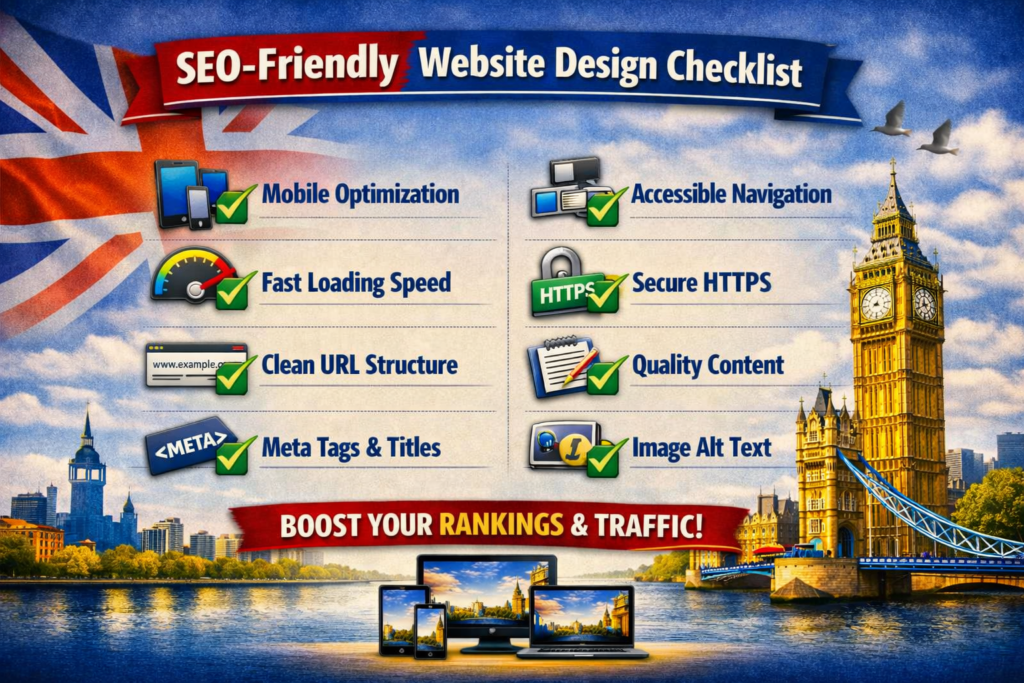
Use this checklist before launching your website:
- Responsive design
- Fast loading speed
- Clear site structure
- SEO-friendly URLs
- Optimized title tags
- Compelling meta descriptions
- Proper heading hierarchy
- Compressed images
- Descriptive ALT text
- High-quality content
- Internal linking
- HTTPS security
- Easy navigation
- Core Web Vitals optimization
- Clear calls-to-action
- Local SEO optimization
- Accessibility improvements
- Schema markup
- XML sitemap
- Analytics setup
- Search Console verification
- Regular maintenance and updates
Common SEO Website Design Mistakes
Avoid these common mistakes:
- Slow-loading pages
- Poor mobile experience
- Duplicate content
- Broken links
- Missing metadata
- Oversized images
- Weak internal linking
- Confusing navigation
- Keyword stuffing
- Ignoring technical SEO
Fixing these issues improves both rankings and user experience.
Final Thoughts
SEO-friendly website design is about more than just aesthetics. A successful website should be fast, secure, mobile-responsive, easy to navigate, and built with both users and search engines in mind.
By following this checklist, you’ll create a website that attracts more visitors, ranks better in search results, and delivers a smoother experience that encourages users to become customers.
SEO is an ongoing process, so continue monitoring your website’s performance and make improvements as your business grows.
Frequently Asked Questions (FAQs)
What is SEO-friendly website design?
SEO-friendly website design is the practice of building a website that is optimized for search engines and provides an excellent user experience through fast performance, mobile responsiveness, clean structure, and quality content.
Does website design affect SEO?
Yes. Factors such as page speed, mobile usability, navigation, accessibility, and website structure all influence search engine rankings and user engagement.
Why is mobile responsiveness important for SEO?
Search engines prioritize mobile-friendly websites because a large percentage of users browse the internet on smartphones and tablets. Responsive design helps improve rankings and user experience.
How can I improve my website’s loading speed?
Compress images, use modern image formats, minimize CSS and JavaScript, enable caching, choose reliable hosting, and remove unnecessary plugins to improve page speed.
How often should I review my website’s SEO?
It’s a good idea to review your website at least once a month. Regular audits help identify technical issues, update content, monitor rankings, and keep your site optimized for search engines.